Oldalak

Thursday, January 5, 2017

How to embed video in your site, from FACEBOOK


Things communicated to the Facebook to share your site can be embedded in a public post or video. To embed a video containing entries posted with the video message will be displayed. If only the video embeds, will only appear in the video player.
Embed this video:

     Open the video you want to embed.
     the top-right of the entry, click the icon and choose Embed Video.
     Copy and paste the code displayed and add them to your website or your own website.

If beágyazol a video and its target audience is a change in the public setting, your website, a message will warn that the embedded video is no longer available.
Note: Facebook does not currently provide the possibility of downloading videos.


Wednesday, December 28, 2016

How to create new cursor for your website.


First . Create new picture with FIREWORK with out background.
Save in the kurzor.PNG format.

Secund copy code to your website.
<style>
 body{cursor: url(kurzor3.png),default;}
</style> 


Wednesday, December 14, 2016

Insert into mySQL databasa with php


Create 3 file.

1. File name input.html


<html>

<header></header>

 <body>

 <form action="insert.php" method="post">

Username: <input name="adnam" size="20" /><br />
Password: <input name="adpsw" size="20" /><br />
<input type="submit" value="SEND" />
</form>


</body>


</html>  

2. File name insert.php 


<?php

$username = $_POST["adnam"];
$password = $_POST["adpsw"];

 $conn = mysql_connect('localhost', 'root', '');

  if (!$conn)
  {
    die('Could not connect: ' . mysql_error());
  }
 
  mysql_select_db('users');
 
  $query="INSERT INTO user (username, password)
VALUES ('$username','$password')";

 mysql_query($query);

/*if ($conn->query($sql) === TRUE) {
    echo "New record created successfully";
} else {
    echo "Error: " . $sql . "<br>" . $conn->error;
}*/

header("location:ok.html");

 mysql_close($conn);
?>

3.File name ok.html   


<html>
 <head></head>
<body>

 User inserted to databasa OK . <a href="input.html">New User</a>

</body>
</html>


Wednesday, October 19, 2016

How to create DB in MySQL with PhP


 <?php

$db_username="root"; /*Username in localhost is ROOT*/
$db_password="";  /*DataBasa Password*/
$db_hoster="localhost"; /*Just in the LocalHost */


   $conn = mysql_connect($db_hoster, $db_username, $db_password);
   if(! $conn )
   {
     die('DataBasa error: ' . mysql_error());
   }


   // Create database
   $databasa_name="MyFirstDB";
 
    $sql = "CREATE DATABASE $databasa_name";
    if (mysql_query($sql, $conn)) {
    echo "Database created successfully";
    } else {
    echo "Error creating database: " . mysqli_error($conn);
    }


    mysql_close($conn);


?>


How To Connect MySQL DataBasa


<?php

$db_username="root"; /*Username in localhost is ROOT*/
$db_password="";  /*DataBasa Password*/
$db_hoster="localhost"; /*Just in the LocalHost */


   $conn = mysql_connect($db_hoster, $db_username, $db_password);
   if(! $conn )
   {
     die('DataBasa error: ' . mysql_error());
   }
   echo 'DataBasa READY';


   mysql_close($conn);


?>


Tuesday, October 18, 2016

How to install Local Server


Search in Google WebBrowser
Write in XAMPP download.


Click to download button 


Click to Save File button


Open download container folder


 Click to Next button


Download Xammp localserver here
https://www.apachefriends.org/index.html

XAMPP cent would recommend what I use it.


 First and easiest when it comes to the Web server.
XAMPP cent would recommend what I use it. Totally simple to install.
Once this is done you can begin acquiring programming. What is a NOTEPAD write, but you can search on the net is a program that will help in programming such as Macromedia Dreamweaver or newer version of ADOBE what has been marketed.

XAMPP is installed, it automatically installs the necessary local server programs,
databasa mysql, php, java, css, etc.


Wednesday, October 12, 2016

WebMarket, Applications against expectations


Tuesday, October 11, 2016

Overflow scroll with css


<!DOCTYPE html PUBLIC "-//W3C//DTD XHTML 1.0 Transitional//EN" "http://www.w3.org/TR/xhtml1/DTD/xhtml1-transitional.dtd">
<html xmlns="http://www.w3.org/1999/xhtml">
<head>
<meta http-equiv="Content-Type" content="text/html; charset=utf-8" />
<title>Overflow scroll with css</title>
<style>
div {
    background-color:#6F0;
    width: 200px;
    height: 50px;
    border: 1px solid black;
    overflow: scroll;
}
</style>
</head>

<body>

<div>abcddefghijklmno abcdd ghij klmno cddefghijklmn abc abcddefghijklmno abcdd ghij klmno cddefghijklmn abc abcddefghijklmno abcdd ghij klmno cddefghijklmn abc abcddefghijklmno abcdd ghij klmno cddefghijklmn abc abcddefghijklmno abcdd ghij klmno cddefghijklmn abc.</div>

</body>
</html>


Friday, October 7, 2016

Overflow hidden with css


<!DOCTYPE html PUBLIC "-//W3C//DTD XHTML 1.0 Transitional//EN" "http://www.w3.org/TR/xhtml1/DTD/xhtml1-transitional.dtd">
<html xmlns="http://www.w3.org/1999/xhtml">
<head>
<meta http-equiv="Content-Type" content="text/html; charset=utf-8" />
<title>Overflow hidden with css</title>
<style>
div {
    background-color:#6F0;
    width: 200px;
    height: 50px;
    border: 1px solid black;
    overflow: hidden;
}
</style>
</head>

<body>

<div>abcddefghijklmno abcdd ghij klmno cddefghijklmn abc abcddefghijklmno abcdd ghij klmno cddefghijklmn abc abcddefghijklmno abcdd ghij klmno cddefghijklmn abc abcddefghijklmno abcdd ghij klmno cddefghijklmn abc abcddefghijklmno abcdd ghij klmno cddefghijklmn abc.</div>

</body>
</html>


Thursday, October 6, 2016

Overflow visible with css


<!DOCTYPE html PUBLIC "-//W3C//DTD XHTML 1.0 Transitional//EN" "http://www.w3.org/TR/xhtml1/DTD/xhtml1-transitional.dtd">
<html xmlns="http://www.w3.org/1999/xhtml">
<head>
<meta http-equiv="Content-Type" content="text/html; charset=utf-8" />
<title>Overflow visible with css</title>
<style>
div {
    background-color:#6F0;
    width: 200px;
    height: 50px;
    border: 1px solid black;
    overflow: visible;
}
</style>
</head>

<body>

<div>abcddefghijklmno abcdd ghij klmno cddefghijklmn abc abcddefghijklmno abcdd ghij klmno cddefghijklmn abc abcddefghijklmno abcdd ghij klmno cddefghijklmn abc abcddefghijklmno abcdd ghij klmno cddefghijklmn abc abcddefghijklmno abcdd ghij klmno cddefghijklmn abc.</div>

</body>
</html>


Saturday, October 1, 2016

Buttons with css


<!DOCTYPE html PUBLIC "-//W3C//DTD XHTML 1.0 Transitional//EN" "http://www.w3.org/TR/xhtml1/DTD/xhtml1-transitional.dtd">
<html xmlns="http://www.w3.org/1999/xhtml">
<head>
<meta http-equiv="Content-Type" content="text/html; charset=utf-8" />
<title>Buttons with css</title>
</head>
<style>
.button {
    background-color: #FF0;
    border: none;
    color: #060;
    padding: 15px 32px;
    text-align: center;
    text-decoration: none;
    display: inline-block;
    font-size: 16px;
    margin: 4px 2px;
    cursor: pointer;
}

.button1 {border-radius: 2px;}
.button1:hover{ color:#900; background-color:#FC0;}
.button2 {border-radius: 4px;}
.button2:hover{ color:#900; background-color:#FC0;}
.button3 {border-radius: 8px;}
.button3:hover{ color:#900; background-color:#FC0;}
.button4 {border-radius: 12px;}
.button4:hover{ color:#900; background-color:#FC0;}
.button5 {border-radius: 24px;}
.button5:hover{ color:#900; background-color:#FC0;}


.button6 {border-radius: 10%;}
.button6:hover{ color:#900; background-color:#FC0;}
.button7 {border-radius: 20%;}
.button7:hover{ color:#900; background-color:#FC0;}
.button8 {border-radius: 30%;}
.button8:hover{ color:#900; background-color:#FC0;}
.button9 {border-radius: 40%;}
.button9:hover{ color:#900; background-color:#FC0;}
.button10 {border-radius: 50%;}
.button10:hover{ color:#900; background-color:#FC0;}

</style>


</head>
<body>
<p>
<button class="button button1">2px</button>
<button class="button button2">4px</button>
<button class="button button3">8px</button>
<button class="button button4">12px</button>
<button class="button button5">24px</button>
</p>
<p>
<button class="button button6">2px</button>
<button class="button button7">4px</button>
<button class="button button8">8px</button>
<button class="button button9">12px</button>
<button class="button button10">24px</button>
</p>
</body>
</html>
<body>
</body>
</html>


Friday, September 30, 2016

Border style in Paragraph


<!DOCTYPE html PUBLIC "-//W3C//DTD XHTML 1.0 Transitional//EN" "http://www.w3.org/TR/xhtml1/DTD/xhtml1-transitional.dtd">
<html xmlns="http://www.w3.org/1999/xhtml">
<head>
<meta http-equiv="Content-Type" content="text/html; charset=utf-8" />
<title>Border Paragraf</title>
<style>
#table{
    width:300px;}
#dotted {border-style: dotted;}
#dashed {border-style: dashed;}
#solid {border-style: solid;}
#double {border-style: double;}
#groove {border-style: groove;}
#ridge {border-style: ridge;}
#inset {border-style: inset;}
#outset {border-style: outset;}
#none {border-style: none;}
#hidden {border-style: hidden;}


</style>
</head>

<body>
<div id="table">
<p id="dotted">Hello World - dotted</p>
<p id="dashed">Hello World - dashed</p>
<p id="solid">Hello World - solid</p>
<p id="double">Hello World - doudle</p>
<p id="groove">Hello World - groove</p>
<p id="ridge">Hello World - ridge</p>
<p id="inset">Hello World - inset</p>
<p id="outset">Hello World - outset</p>
<p id="none">Hello World - none</p>
<p id="hidden">Hello World - hidden</p>
</div>
</body>
</html>


Friday, September 23, 2016

Backround color


<!DOCTYPE html PUBLIC "-//W3C//DTD XHTML 1.0 Transitional//EN" "http://www.w3.org/TR/xhtml1/DTD/xhtml1-transitional.dtd">
<html xmlns="http://www.w3.org/1999/xhtml">
<head>
<meta http-equiv="Content-Type" content="text/html; charset=utf-8" />
<title>Backround COLOR</title>
<style>
h1 {
    background-color: green;
}

div {
    background-color: lightblue;
}

p {
    background-color: yellow;
}
</style>


</head>

<body>
</body>

<div>
    <h1>HELLO</h1>
    <p>World</p>

</div>


</html>


Monday, June 27, 2016

Transform with CSS


Transform with CSS


<!DOCTYPE html PUBLIC "-//W3C//DTD XHTML 1.0 Transitional//EN" "http://www.w3.org/TR/xhtml1/DTD/xhtml1-transitional.dtd">
<html xmlns="http://www.w3.org/1999/xhtml">
<head>
<meta http-equiv="Content-Type" content="text/html; charset=utf-8" />
<title>Css TRANFORM</title>
<style>
#transform1{
    transform: rotate( -20deg );}
   
#transform2{
    transform: rotateX( -45deg );}
   
#transform3{
    transform: rotateY( -45deg );}
   
#transform4{
    transform: rotate3d( 30, 0, 0, 30deg);}

#transform5{
    transform: scaleX( 0.8 );}
   
#transform6{
    transform: scaleY( 0.8 );}
   
#transform7{
    transform: skewX( 20deg );}
   
#transform8{
    transform: skewY( 20deg );}
   
#transform9{
    transform-origin:20% 40%;}
   

</style>
</head>

<body>
<table width="500" height="500" border="0" align="center">
  <tr>
    <td align="center" valign="middle"><img id="transform1" src="madarka.jpg" width="150" height="120" /></td>
    <td align="center" valign="middle"><img id="transform2" src="madarka.jpg" width="150" height="120" /></td>
    <td align="center" valign="middle"><img id="transform3" src="madarka.jpg" width="150" height="120" /></td>
  </tr>
  <tr>
    <td align="center" valign="middle"><img id="transform4" src="madarka.jpg" width="150" height="120" /></td>
    <td align="center" valign="middle"><img id="transform5" src="madarka.jpg" width="150" height="120" /></td>
    <td align="center" valign="middle"><img id="transform6" src="madarka.jpg" width="150" height="120" /></td>
  </tr>
  <tr>
    <td align="center" valign="middle"><img id="transform7" src="madarka.jpg" width="150" height="120" /></td>
    <td align="center" valign="middle"><img id="transform8" src="madarka.jpg" width="150" height="120" /></td>
    <td align="center" valign="middle"><img id="transform9" src="madarka.jpg" width="150" height="120" /></td>
  </tr>
</table>
</body>
</html>


Friday, June 24, 2016

Image Tooltip with CSS


Image Tooltip with CSS
<!DOCTYPE html PUBLIC "-//W3C//DTD XHTML 1.0 Transitional//EN" "http://www.w3.org/TR/xhtml1/DTD/xhtml1-transitional.dtd">
<html xmlns="http://www.w3.org/1999/xhtml">
<head>
<meta http-equiv="Content-Type" content="text/html; charset=utf-8" />
<title>image tooltip</title>
<style>

.tooltip {
    position: relative;
    display: inline-block;
    border-bottom: 1px dotted black;
}


.tooltip .tooltipimage {
    top: 85px;
    left: 0px;
    visibility: hidden;
    width: 120px;
    position: absolute;
    z-index: 1;
}

.tooltip:hover .tooltipimage {
    visibility: visible;
}
</style>
</head>

<body>

<div class="tooltip"><img src="ten1.jpg" height="80"  border="0" /> <span class="tooltipimage"><img src="ten1.jpg" width="300" border="0" /></span></div>
<div class="tooltip"><img src="Rain Drops Wallpaper(05).jpg" height="80" /><span class="tooltipimage"><img src="Rain Drops Wallpaper(05).jpg" width="300" border="0" /></span></div>
</body>
</html>


Thursday, June 23, 2016

Text Tooltip with CSS


Text Tooltip with CSS

 <!DOCTYPE html PUBLIC "-//W3C//DTD XHTML 1.0 Transitional//EN" "http://www.w3.org/TR/xhtml1/DTD/xhtml1-transitional.dtd">
<html xmlns="http://www.w3.org/1999/xhtml">
<head>
<meta http-equiv="Content-Type" content="text/html; charset=utf-8" />
<title>tooltip</title>
<style>
/* Tooltip container */
.tooltip {
    position: relative;
    display: inline-block;
    border-bottom: 1px dotted black; /* If you want dots under the hoverable text */
}


.tooltip .tooltiptext {
    top: 25px;
    left: 105%;
    visibility: hidden;
    width: 120px;
    background-color: black;
    color: #fff;
    text-align: center;
    padding: 5px 0;
    border-top-right-radius: 10px;
    border-bottom-right-radius: 10px;
    border-bottom-left-radius: 10px;
    position: absolute;
    z-index: 1;
}


.tooltip:hover .tooltiptext {
    visibility: visible;
}
</style>
</head>

<body>

<div class="tooltip"><a href="#" >this is one link with tooltip <span class="tooltiptext">Hello, this is a link</span>
</div>
</body>
</html>


Monday, June 20, 2016

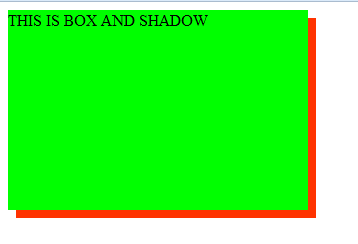
Box Shadow with CSS


Box Shadow with CSS

 <!DOCTYPE html PUBLIC "-//W3C//DTD XHTML 1.0 Transitional//EN" "http://www.w3.org/TR/xhtml1/DTD/xhtml1-transitional.dtd">
<html xmlns="http://www.w3.org/1999/xhtml">
<head>
<meta http-equiv="Content-Type" content="text/html; charset=utf-8" />
<title>Box Shadow</title>

<style>
    div{
        width:300px;
        height:200px;
        background-color:#0F0;
        box-shadow:8px 8px 0 #F30;}
</style>

</head>

<body>

    <div>
        THIS IS BOX AND SHADOW
    </div>

</body>
</html>


CSS Programing


Animation with CSS

Atributes Selector

Advenced backround example


Background Image

Box Shadow with CSS

Polaroid effect with css


Text Tooltip with CSS

Image Tooltip with CSS


Sunday, June 19, 2016

Background Image with CSS


Background Image with CSS

<!DOCTYPE html PUBLIC "-//W3C//DTD XHTML 1.0 Transitional//EN" "http://www.w3.org/TR/xhtml1/DTD/xhtml1-transitional.dtd">
<html xmlns="http://www.w3.org/1999/xhtml">
<head>
<meta http-equiv="Content-Type" content="text/html; charset=utf-8" />
<title>Backround Image</title>

<style>

    body{
        background-image:url(19.JPG);}

</style>

</head>

<body>

    <h1>This is a Backround image</h1>

</body>
</html>